Loom vs Scrimba Explain: Choosing the Right Format for Code Walkthroughs
Loom captures a running app and a developer’s explanation; Scrimba Explain turns code or text into narrated slides, diffs and diagrams.
Code walkthroughs work best when the format matches what a teammate needs to understand. Loom records a person demonstrating a screen, app or debugging session. Scrimba Explain generates a narrated lesson from code, a change or written material. One preserves what happened on screen; the other organizes an explanation around the code itself.
That difference matters in engineering teams. A recording can show a bug that only appears in a running system, while a generated lesson can make a design choice or code change easier to follow at someone else’s pace. Teams that regularly need both kinds of explanation may find a place for both tools.
The details below reflect product information checked on October 23, 2026, with some plan and sharing details checked on November 16, 2026. Prices are US monthly rates where specified.
What each tool produces
Loom captures your screen, voice and, optionally, your face. Its recording is shaped by what you show and say during the take. If you lose your place, the viewer may have to work through the same detour. On Business, Loom adds a drawing tool and mouse emphasis; its recorder can also capture system audio. See Loom’s plan details.
Scrimba Explain takes a different route. Its explainers aren’t screen recordings: they’re assembled from typed slides and narrated by an AI voice. A coding assistant such as Claude Code or Codex can read material in a repository and create an explainer. ChatGPT can do the same when given the relevant text, files or diff. The output can include code slides, side-by-side changes and diagrams.
Code slides show short sections of code, with the pointer highlighting the identifier, call, condition or return value under discussion. Scrimba’s documentation suggests keeping a code slide to about 15 lines. Diff slides show the previous version beside the updated one. Diagram types include flowcharts, sequence diagrams, state diagrams, class diagrams and entity relationship diagrams. These structures give viewers a visual path through ideas that can be hard to explain with a screen recording alone. Scrimba describes the formats in its guides to code slides, diffs and diagrams.
The distinction also maps to a finding from code review research. Alberto Bacchelli and Christian Bird, studying code review at Microsoft, described understanding code and changes as a key part of review. They also observed that many of the mechanisms developers use to build that understanding weren’t met by the tools available at the time. A video of a live system can help answer “What happens when I do this?” A lesson built around the code can answer “Why does this change work?” Read their ICSE 2013 study.
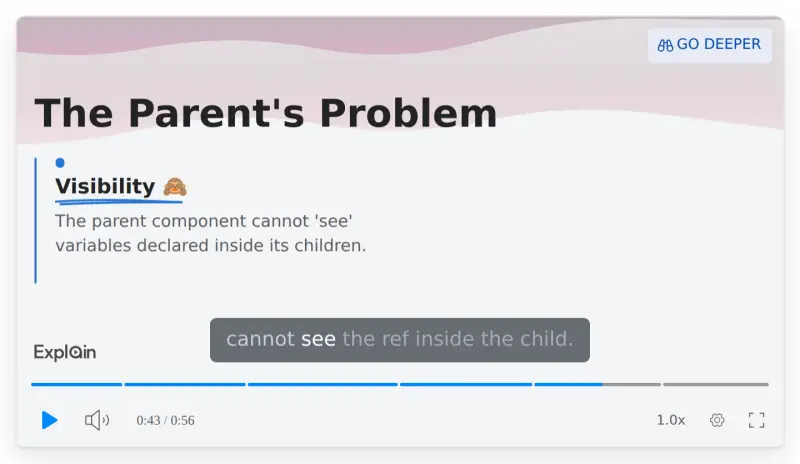
A slide from Scrimba’s “Moving useRef to Child Components” example, built from a diff. Image source: Scrimba Explain.
When a recording tells the story better
Loom is a strong fit when the viewer needs to see an event unfold: a bug appearing, an interface responding to a particular action, a debugger stepping through execution, or a developer explaining a judgment call in their own voice.
- Reproducing a bug: Loom’s Bug Report mode, available in its Chrome extension, records video alongside device information, console output and network logs. Viewers can create work items in Jira or issues in Linear from the report. The feature requires Business + AI or Enterprise, according to Loom’s support documentation.
- Showing a live interface: If a layout breaks at a particular width, or a sequence of clicks produces an unexpected result, a recording preserves the behavior as it happened. Scrimba Explain doesn’t show the running app, because it doesn’t record a screen.
- Giving feedback in your own voice: Loom supports comments and emoji reactions across plans and connects with tools including Jira, Linear, GitHub and GitLab. For a reviewer, hearing the developer’s emphasis and seeing the relevant screen can make feedback easier to act on. Details are on Loom’s engineering page.
- Turning a demonstration into instructions: Loom’s Record for agent mode can turn a recording into a prompt for an AI agent such as Rovo or Claude. It’s in open beta for Business + AI and Enterprise. This direction runs from video toward an agent’s task instructions; Explain runs from code or text toward a lesson. See Atlassian’s Loom guidance.
Loom Starter allows 25 videos per person, with a maximum length of five minutes per recording and resolution up to 720p. That’s enough for short async updates, although teams building a lasting library may need a paid plan.
When generated slides are a better fit
Scrimba Explain suits material whose meaning is already in code or text: a concept that comes up repeatedly, an architecture decision, a pull request or onboarding material. Its slides can be revised after generation by asking for changes to the content, sequence or structure.
For a recurring technical concept, a team might explain Kubernetes networking with a diagram of pods and a Service, followed by a sequence diagram showing a request. Kubernetes documentation describes pods as having their own cluster-wide IP addresses and explains that a Service offers a stable IP address or hostname. A narrated diagram can make those relationships visible; a Loom recording would require someone to draw or demonstrate them live. The reference is the Kubernetes networking documentation.
For an architecture decision, a team can use the decision record as the source material and ask for one slide per section. Michael Nygard’s description of an architecture decision record calls for a short text file covering context, decision, status and consequences, kept in the repository. A comparison prompt such as “X vs Y, when do I use which?” can also produce card slides, according to Scrimba’s cards and lists guide. The recording can explain the decision, but the written record remains useful as the durable reference. See Nygard’s 2011 account.
For a pull request, an agent can read the change and explain its purpose, relevant code and consequences. Scrimba documents a workflow in which a GitHub Action creates an explainer for each pull request ready for review. That can give reviewers a guided introduction, while the code and written description remain available for close inspection. See the pull request workflow.
For repeated explanations, generating another version takes a prompt rather than another recording session. Explain supports narration in 33 languages, which may help teams prepare the same technical explanation for colleagues who prefer different languages. The result still needs review: the tool’s own pages warn that AI can make mistakes.
One topic, two useful formats: GraphQL null bubbling
GraphQL null bubbling is a clear example of why both formats can help. The GraphQL specification says that an execution error at a non-null response position propagates to its parent response position. If that parent is also non-null, the error can continue upward until it reaches a nullable position. The result may be that a larger part of the response becomes null than the failing field alone. The rule appears in sections 6.4.4 and 7.1.6 of the September 2025 GraphQL specification.
Show the failure with Loom
Open an API explorer connected to a staging environment and run a query that triggers a failing non-null field. Record the response as it changes, pointing out data becoming null and the relevant path in errors. Then walk through the schema change that addresses the problem. A short recording can preserve the real response and the context around the failure. The explanation, however, depends on what the speaker says and any annotation they add.
Explain the rule with Scrimba Explain
In Claude Code, working in the repository that contains the schema, a developer could request a wide explainer for frontend developers. The prompt might ask for code slides showing the non-null fields in an Order type, then a sequence diagram tracing how a resolver error turns a parent into null.
Claude Code plans the lesson and sends it to Scrimba slide by slide, according to the Claude Code instructions. Including “wide” in the prompt requests a wide format; otherwise the output may be square. Before sharing, compare each slide with the schema and the GraphQL specification. Generated narration and diagrams can make a rule easier to grasp, but they shouldn’t replace checking the technical details.
Agent access, sharing and allowances
Claude Code connects to Scrimba Explain through an MCP server. The documented command is:
claude mcp add --transport http scrimba-explain https://scrimba.com/explain/mcpClaude Code users can also install the Explain by Scrimba plugin and use /explain. Codex supports the Explain Video Generator plugin in the ChatGPT desktop app and the Codex command line interface. Its IDE extension doesn’t support plugins, so the MCP server is the route there. The setup details are in Scrimba’s ChatGPT and Codex guide.
ChatGPT users can install the Explain Video Generator plugin. Since ChatGPT doesn’t have direct access to a local repository, provide the diff or attach the changed files before requesting an explainer. If a Scrimba account is connected, explainers are saved to it as they’re created.
Allowance rules depend on whether a draft is claimed. Drafts produced through Claude Code, Codex, the MCP server or an agent plugin start unclaimed and don’t count toward an account’s allowance until claimed. A free account can keep five explainers, while Pro includes 100 per month. In ChatGPT, connecting a Scrimba account means each explainer is claimed when it’s created and counts immediately. Opening a Claude Code draft while signed in also claims it. Check Scrimba’s plan and allowance details before choosing a workflow.
Drafts made through Claude Code or the MCP server start private. A viewer can’t watch one just by getting its link. Open the draft while signed in to claim it, then set it to Unlisted before sharing. Explain also offers embedding for explainers that are at least unlisted; visitors can watch an embedded explainer without a Scrimba account.
Loom has agent connections of its own. Since August 11, 2026, Loom tools have been available in Atlassian’s Rovo MCP public preview. Agents can retrieve video metadata and transcripts, add comments, organize videos and upload Loom recordings, according to the Atlassian Community post. Those tools work with Loom recordings; they don’t generate a code lesson from source files.
Pricing, downloads and audience signals
Both products have free entry points, but their limits differ. Loom Starter includes 25 videos per person, recordings of up to five minutes and resolution up to 720p. Scrimba’s free account keeps five explainers, allows three edits per explainer and doesn’t include MP4 downloads. Agents can create unclaimed drafts beyond the account limit; claiming a draft is what uses an allowance, except when ChatGPT is connected to the account and claims each new explainer automatically.
Loom Business costs $18 per user per month with monthly billing. It adds unlimited videos, resolution up to 4K, downloads, password protection and no Loom branding. Business + AI costs $24 per user per month and adds summaries, chapters, AI workflows and Record for agent mode, as well as Bug Report mode. Loom says annual billing can save up to 17%. For a team of eight on Business + AI, monthly billing comes to $192. Loom’s support page says Starter users can’t download videos; downloads begin on Business. See Loom pricing and its download guidance.
Scrimba Pro includes 100 explainers a month, unlimited edits and MP4 downloads. Downloads render at 1080p and 60 frames per second by default for explainers you own that are public or unlisted. Free explainers display the Explain logo. Scrimba’s audience data is limited to views and likes, while Loom provides viewer data on all plans and engagement data on Business.
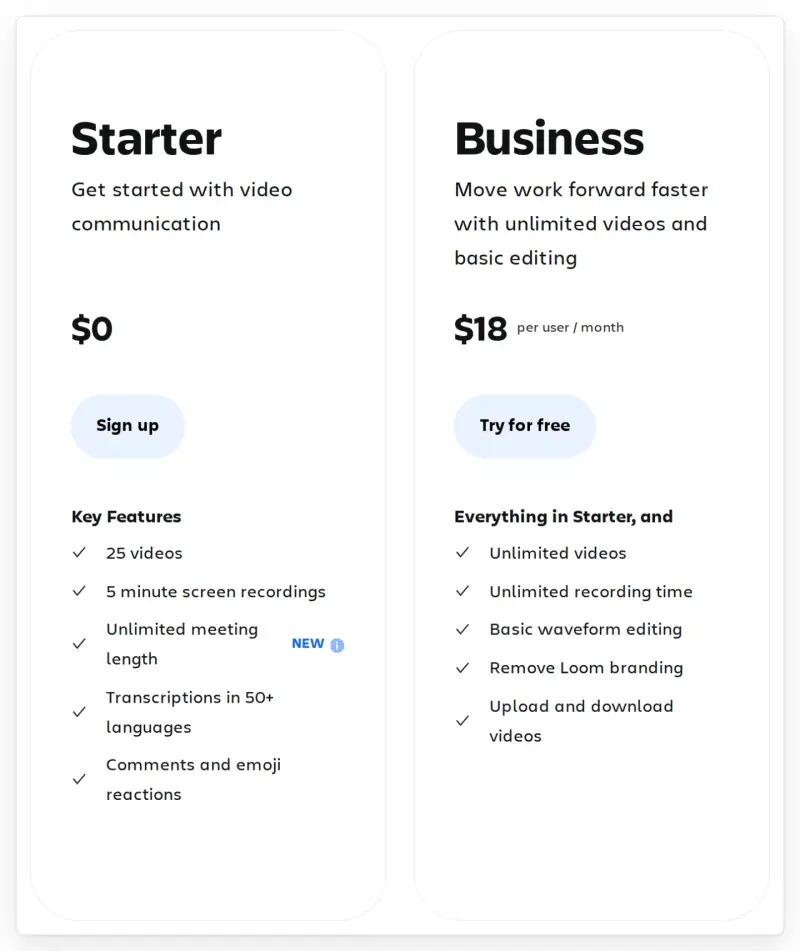
Loom’s pricing information, shown on its US page with monthly billing. See Loom pricing.
Both tools involve third-party data handling. Loom sends transcripts to OpenAI for its AI features. The Explain plugin listing says ChatGPT may share relevant chats and memories with the app. Teams preparing recordings or explainers should keep API keys, secrets and customer data out of the material.
When a video isn’t the right artifact
Some explanations belong in the repository or a written record. GitHub can render Mermaid diagrams in issues, discussions, pull requests, wikis and Markdown files, so a diagram in a README may be easier to maintain than a video. An architecture decision record and pull request description should remain easy to find as written references; a recording or generated explainer can supplement them. For a new engineer’s first week, a collection of links to code, diagrams and short walkthroughs may be more useful than relying on one long video. See GitHub’s Mermaid documentation.
Choosing a workflow
Choose Loom when the explanation depends on seeing the real interface, hearing a developer’s judgment or following a live reproduction. Choose Scrimba Explain when the goal is to teach the structure or reasoning in code, a diff or a written decision. An engineering team can pair them: use Loom to show what broke, then Explain to show why the change addresses it.
For a pull request, that pairing gives reviewers two different kinds of context. The recording can establish the behavior; the generated lesson can guide attention through the change. Either way, check the content before sharing, keep the underlying code or written decision accessible, and select a format that helps the next person answer the question they actually have.