PowerPoint to Video Converters: Comparing Narration, AI Presenters and LMS Tracking
Compare seven tools by how they handle slide notes, narration, animations, pricing and LMS tracking to find the right fit for your training deck.
A training deck often depends on a presenter to explain what its headlines leave unsaid. Turning it into a useful video means deciding where that explanation will come from: your own narration, speaker notes, slide text or a new script. That choice also determines whether viewers get a simple MP4, an AI presenter or a course their learning platform can track.
Seven tools cover those different needs. Microsoft PowerPoint and Canva keep the slides and let you supply the voice. Synthesia, HeyGen and Fliki can generate narration from notes or slide content. iSpring Suite adds course interactions and learner tracking. Scrimba Explain builds a new narrated lesson from a deck, including explanations beyond the words on the slides.
Start with the narration
If a deck's speaker notes already contain a full explanation, AI voice tools can turn them into narration with relatively little script work. Thin notes change the equation: a converter that falls back to slide text may simply read a list of headings aloud. For decks that rely on a trainer's spoken context, Scrimba Explain is the option here that writes a new explanatory script and creates new slides and diagrams.
PowerPoint and Canva take a different approach. They retain the presentation, while the creator records narration or provides text for an AI voice. That gives the speaker more control over the words, but also leaves the script-writing and recording work with them.
| Tool | Best fit | How it handles the content | Input | Presenter | LMS support | Paid MP4 or plan |
|---|---|---|---|---|---|---|
| Synthesia | Presenter-led training from a finished deck | Uses speaker notes, or slide text if notes are absent | .pptx | Optional AI avatar per scene | SCORM on Business | Starter, $19/month |
| Microsoft PowerPoint | Exporting the deck with your own voice | Retains slides; notes can guide your recording | PowerPoint deck | Your camera, if enabled | None; MP4 or WMV | Included with desktop PowerPoint |
| Scrimba Explain | Turning headline-heavy slides into a lesson | Creates a new script and new slides from the deck | Narrated slides and diagrams | Embed, or MP4 on Pro | MP4 download on Pro | |
| HeyGen | Adding an avatar to each slide | Uses speaker notes as the script | PPT, PPTX or PDF, up to 50 MB | AI avatar overlay | SCORM on Business | Creator, $29/month |
| iSpring Suite | Building a trackable course in PowerPoint | Keeps slides; adds recorded audio or text-to-speech | PowerPoint deck | Optional; AI avatars in Suite AI | SCORM, xAPI, cmi5 and AICC | Suite, $970 per author/year |
| Canva | Redesigning a deck and exporting a free MP4 | Keeps slides; voiceover comes from text you write | PPT | None by default | MP4 file | Free MP4; Pro, US$18/month |
| Fliki | Generating narration in a range of voices | Builds a script per slide from text, headings and notes | PDF, PPT or PPTX, up to 20 MB | Optional AI avatar | MP4 file | Standard, $28/month |
Prices and plan details are from vendor pricing pages, November 2026.
What each converter does
PowerPoint: preserve the presentation and record your voice
Desktop PowerPoint exports a presentation through File > Export > Create a Video, saving as MP4 or WMV at resolutions up to Ultra HD (4K). Animations and transitions play as they do in the slideshow. You can record narration slide by slide, with speaker notes visible as a teleprompter.
Without recorded timings, each slide stays on screen for five seconds, so most narrated presentations need a recording before export. Microsoft says video creation can take up to several hours for a long deck. There’s no AI voice or generated presenter: the result reflects your delivery, with your camera available if you choose to use it.
Canva: free MP4 export with creator-written narration
Canva imports a PPT and lets you adjust the design before downloading the presentation as an MP4. You can record yourself with Present and Record, upload audio or generate an AI voiceover from text you provide. Canva doesn’t write that script for you, so the voiceover depends on the quality of your own wording.
The MP4 download is free. Canva Pro, listed at US$18 a month for one person, adds premium content and AI features.
Synthesia: an avatar-led video from notes
Synthesia imports .pptx files up to 1 GB and 150 slides. With Auto-populate script enabled, it takes each scene’s script from the slide’s speaker notes; if there are no notes, it uses the slide text. You can choose an AI avatar for every scene or leave avatars out, then edit text, shapes and timing. PowerPoint animations don’t transfer, though Synthesia lets you add its own.
The tool is suited to presenter-led training when the notes are already written in full sentences. Its avatars support more than 140 languages. The Basic plan offers 10 minutes of watermarked video a month; Starter costs $19 a month and adds MP4 downloads. SCORM export is on Business, listed at $99 a month for one member. Import details are in Synthesia’s PowerPoint documentation.
HeyGen: a consistent avatar across slides
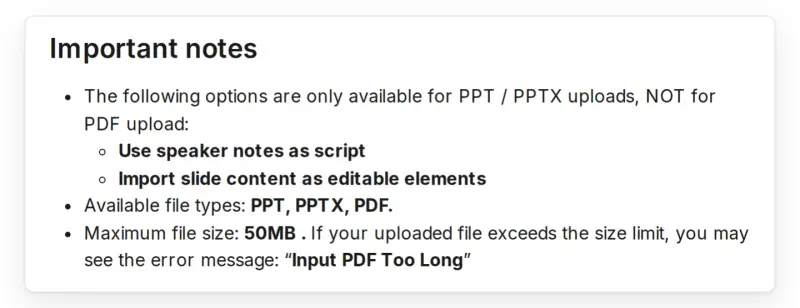
HeyGen accepts PPT, PPTX and PDF files up to 50 MB, importing the first 50 slides. The selected avatar appears as a circular overlay in the bottom-right corner of every scene. The option to use speaker notes as the script works with PPT and PPTX uploads; PDF imports don’t provide that notes-based script.
The free plan allows three watermarked videos a month, each up to one minute. Creator costs $29 a month and exports 1080p video without branding. SCORM export and LMS integrations require Business, listed at $149 a month.
Fliki: narrated slides from notes and text
Fliki takes PDF, PPT or PPTX files up to 20 MB. It draws on slide text, headings and speaker notes to write a voiceover script for each slide. Users can add an AI avatar and export a 1080p MP4 on the Standard plan.
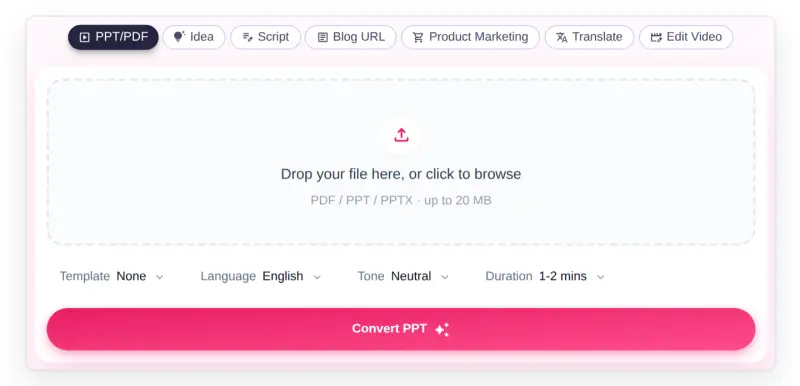
The free plan limits exports to five minutes, 720p and a watermark; PPT-to-video availability is limited. Standard costs $28 a month and allows 1080p videos up to 15 minutes.
iSpring Suite: build a course the LMS can track
iSpring runs as a PowerPoint add-in, retaining the slides while adding quizzes, interactions and narration. Authors can record audio or use text-to-speech in 53 languages. The course can be published to SCORM, xAPI, cmi5 or AICC, or exported as an MP4 for YouTube.
Its focus is course delivery and completion tracking, which suits teams that need learner progress recorded in an LMS. Suite costs $970 per author a year. Suite AI, with AI avatars and lifelike text-to-speech, is $1,290 per year. A 14-day trial is available.
Scrimba Explain: add the explanation the deck leaves out
Scrimba Explain turns a deck into a narrated lesson with typed slides and diagrams, designed for viewers who weren’t in the room. Rather than reading bullet points aloud, it creates an explanation of the ideas behind them. The tool is made by Scrimba, which publishes this blog.
For example, a 30-slide onboarding deck can become a short course made up of linked lessons. A process described on a crowded slide can instead appear as a diagram that unfolds alongside the narration. Lessons can end with multiple-choice questions, and the tool can produce narration in any of 33 languages, using a native voice.
To use it, save the PowerPoint deck as a PDF and attach that file on Scrimba Explain; the tool takes PDFs rather than .pptx files. The same tool is called Explain Video Generator in ChatGPT, where you can attach the PDF and ask for an explainer. It doesn’t create SCORM packages, so an LMS can use the lesson as an embed.
For internal material, set the explainer to Unlisted before creating it, then share or embed its link in an intranet page. Viewers don’t need a Scrimba account. A free account can keep five explainers for the life of the account; a course counts as one, regardless of how many lessons it contains. Explain videos made in ChatGPT aren’t capped, but a connected Scrimba account claims each one as it’s made, counting toward that five. MP4 downloads and commercial use require Scrimba Pro; the current price appears in the upgrade dialog.
Free plans, paid exports and LMS costs
Free tiers often restrict duration, resolution or branding. PowerPoint’s export is included with desktop PowerPoint, and Canva allows a free MP4 download. Synthesia, HeyGen and Fliki offer free video with limits or watermarks. Scrimba Explain starts with a free account, while its MP4 download is a Pro feature. iSpring offers a 14-day trial.
| Tool | Free access | First plan with an unwatermarked MP4 |
|---|---|---|
| Synthesia | Basic: 10 minutes per month, watermarked | Starter, $19/month |
| Microsoft PowerPoint | Included with desktop PowerPoint | Included |
| Scrimba Explain | Free account keeps five explainers | Pro; current price shown in upgrade dialog |
| HeyGen | Three watermarked videos per month, up to one minute each | Creator, $29/month |
| iSpring Suite | 14-day trial | Suite, $970 per author/year |
| Canva | MP4 download included | Free |
| Fliki | 720p, watermarked, exports up to five minutes | Standard, $28/month |
Prices and plan details are from vendor pricing pages, November 2026. For one author who needs an LMS package, iSpring Suite’s $970 annual price is below the listed annual cost of Synthesia Business at $99 a month ($1,188) and HeyGen Business at $149 a month ($1,788).
Match the tool to the job
- Notes are complete and an AI presenter fits the training: Synthesia uses the notes as its script and offers optional avatars.
- You’ll narrate in your own voice: PowerPoint records your delivery and preserves its animations and transitions.
- The slides are mostly headlines: Scrimba Explain creates a new explanation, with diagrams and optional quizzes.
- You want an avatar in the corner of every slide: HeyGen applies a consistent avatar overlay.
- Your LMS needs completion records: iSpring Suite supports several course formats, including SCORM and xAPI.
- You want to redesign a deck and export for free: Canva offers an MP4 download, with narration supplied separately.
- You want generated narration from several kinds of slide content: Fliki builds a script from slide text, headings and notes.
Google Slides users have another route: Google Vids can convert a Slides deck. The decision across these tools still comes down to the work the deck needs: preserving a speaker’s delivery, reading prepared notes or creating an explanation for viewers on their own.
Frequently asked questions
Which PowerPoint video converter should I choose?
Choose based on the viewer’s needs and the material already in the deck. Synthesia suits an AI presenter reading prepared notes; PowerPoint suits self-recorded narration; Scrimba Explain suits decks that need new explanations; and iSpring Suite fits courses that require LMS tracking.
Can I make a PowerPoint video for free?
Yes. Desktop PowerPoint includes video export, and Canva offers free MP4 downloads. Synthesia, HeyGen and Fliki have free tiers with limits or watermarks. Scrimba Explain is free to start, though downloading an MP4 requires Pro.
Can AI add voiceover to a PowerPoint?
Yes. Synthesia, HeyGen and Fliki can create narration from notes or slide text. Synthesia and Fliki offer optional avatars; HeyGen places an avatar on each slide. Scrimba Explain writes a new script, while Canva generates speech from text you supply.
Which tool keeps PowerPoint animations?
PowerPoint’s own video export preserves the presentation’s animations and transitions. Synthesia doesn’t import PowerPoint animations, though it can add its own. Canva allows users to add animations and transitions after importing.
Can Canva convert a PowerPoint to MP4?
Yes. Upload the PPT, make any design changes, then download it as an MP4 through Share and Download. Narration can come from your own recording, uploaded audio or an AI voiceover made from text you write.
Key takeaways
- The main difference is where narration comes from: your voice, speaker notes, slide text or a newly written script.
- PowerPoint keeps animations and transitions; without recorded timings, each slide displays for five seconds.
- AI voice tools can read notes, but headline-only slides may produce narration that sounds like a list.
- Scrimba Explain creates a narrated lesson with diagrams and optional quizzes from a PDF deck.
- iSpring Suite provides LMS tracking formats and, at its listed annual price, costs less for one author than the two cited monthly Business plans.
- Canva offers free MP4 export, while the creator remains responsible for the voiceover text.