Best ChatGPT Plugins for Research, Training, Writing and Design
Compare 14 ChatGPT plugins for research, lessons, documents, data, design and code, plus how the Plugin Directory works.


The useful question when choosing a ChatGPT plugin is what work you need it to do. For educators and training teams, the options span research, document editing, translation, calculations, slide design, video lessons and software development. A strong starting point for turning existing course material into a narrated lesson is Scrimba’s Explain Video Generator; other tools can help build the evidence and materials around it.
OpenAI replaced the App Directory with a Plugin Directory on July 9, 2026, while existing app connections continued to work, according to the ChatGPT release notes. The directory groups tools for different tasks, and many require signing in to the service they connect to. The right choice depends on the team’s existing workflow, the type of material it handles and the output learners need.
Start with the work you need done
For lesson production, Explain Video Generator creates narrated explainers from documents, topics, webpages or codebases. HeyGen serves a different need: a video with an avatar or presenter. For research, Consensus helps locate individual studies, while Elicit assembles structured reports. Google Drive and DeepL support document work and translation; Wolfram and Airtable cover calculations and tracked records. Canva, Gamma and Adobe help with visual materials, and GitHub and Lovable support software training and app building.
| Task | Plugin | Main use | Account needed |
|---|---|---|---|
| Make a lesson video | Explain Video Generator | Narrated explainers with slides, diagrams and code | Scrimba login optional |
| Put a presenter on screen | HeyGen | Avatar videos, voice clones, dubbing and short clips | HeyGen account |
| Find research papers | Consensus | Search more than 400 million papers and filter by study design | None to start |
| Build a research report | Elicit | Structured reports across 125 million papers | None to start |
| Work with web portals | TinyFish | Cloud browsing, form completion and data retrieval | Saved browser profiles or a vault |
| Edit documents | Google Drive | Work with Docs, Sheets and Slides | Google account |
| Translate material | DeepL | Translate text and whole files in 100+ languages | DeepL account |
| Calculate or query data | Wolfram | Math and curated data through Wolfram Language | None to start |
| Track training records | Airtable | Query and update records in bases | Airtable account |
| Create designs | Canva | Turn an outline or PDF into a presentation or poster | Canva account |
| Build a slide deck | Gamma | Create and revise slides beside the chat | Gamma account |
| Edit images and PDFs | Adobe | Photo edits, templates and PDFs | Guest use or Adobe account |
| Explore a codebase | GitHub | Read repositories, issues and pull requests | GitHub account |
| Build a web app | Lovable | Create a full-stack app from a description | Lovable account |
Plugin listings shown in ChatGPT’s directory, November 2026.
Turn existing material into a lesson
Explain Video Generator
Explain Video Generator, listed as Scrimba Explain, is designed for people who already have teaching or training material. Add a handbook, lecture notes, webpage, topic or codebase, then ask ChatGPT to make a lesson. Scrimba’s documentation describes a workflow in which ChatGPT returns an explainer card; selecting “Watch explainer” opens the lesson on scrimba.com as it is built.
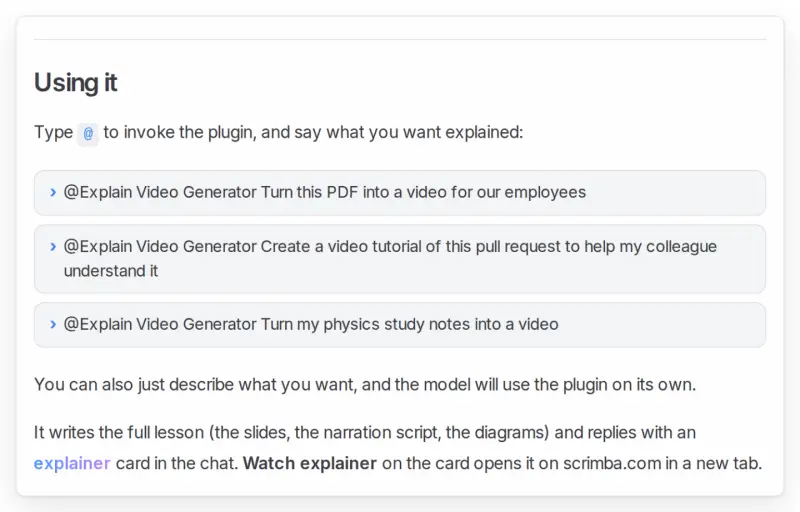
The format combines spoken narration with slides, diagrams and, when relevant, highlighted source code. A screenshot supplied in the chat can appear in a slide. Narration is available in 33 languages with a native voice, which may help teams adapt the same procedure for learners who use different languages.
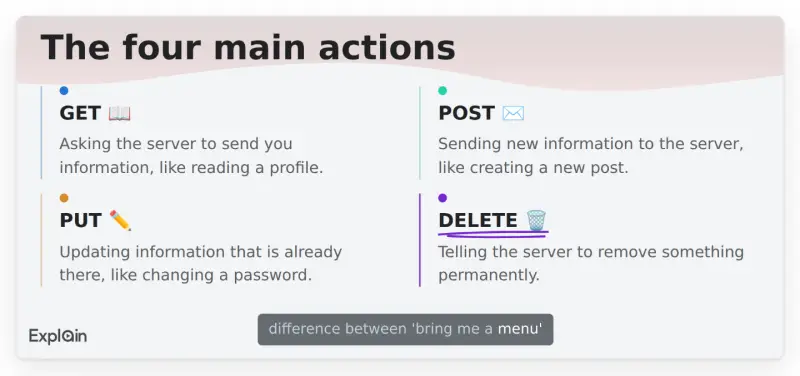
For example, a training team could turn a long onboarding handbook into a shorter narrated walkthrough, with a process such as expense approval shown as a flowchart. Lessons start unlisted and can be shared by link. Downloading an MP4 requires Scrimba Pro. The plugin works with ChatGPT on web, desktop and mobile, as well as Codex; a Scrimba account is optional.
HeyGen
HeyGen fits teams that want a person or avatar addressing the viewer. It can create an AI avatar or use a clone of a person’s face and voice, dub videos into 175+ languages, and turn longer webinars into short vertical clips. It requires a HeyGen account, and video creation uses credits from that account’s plan. The choice between it and Explain Video Generator comes down to the teaching format: presenter-led video or a lesson built around supplied material.
Find and organize evidence
Consensus and Elicit
Consensus searches more than 400 million academic papers from Semantic Scholar, OpenAlex and PubMed. Users can narrow results by year, subject area or study design, including randomized trials and meta-analyses. Results include authors, journal, year and a link to the paper, giving educators a way to follow a plain-language answer back to the underlying research.
Elicit works across a corpus of more than 125 million papers and pulls comparable data points from multiple studies into structured reports. Its listing describes a focus on life-sciences research and development, which makes it especially relevant to trainers working in healthcare or pharmaceutical settings. Consensus is a practical starting point for a focused research question; Elicit is aimed at organizing evidence across a larger set of papers.
TinyFish
TinyFish gives ChatGPT access to a cloud browser for tasks that sit behind a login. It can use saved browser profiles or a vault to sign in, fill and submit forms, compare prices and retrieve listing data. The listing says passwords come from the connected vault rather than being entered into the chat. This can help with research in portals and dashboards, where relevant information isn’t available in a paper search.
Prepare documents, translations and data
The Google Drive plugin, built by OpenAI, connects chat work with Docs, Sheets and Slides. A trainer could ask it to find a previous onboarding deck and draft a recap, or revise a handbook section to match a style guide. The practical benefit is working with material where it already lives instead of moving text between applications. A Google account is required.
DeepL translates text and complete Word, PowerPoint, Excel and PDF files in more than 100 languages while retaining their layout. It can apply glossaries and style rules set up in a DeepL account. DeepL Write also offers rephrasing for tone and grammar, making the plugin useful when a team needs translated materials to stay consistent with its terminology.
Wolfram sends questions to Wolfram Language and uses Wolfram|Alpha’s curated data to return computed results. Its listed capabilities include differential equations, chemical structures and socioeconomic data. That gives lecturers and training teams a calculation tool for work where a numerical result needs to be computed rather than estimated in chat.
Airtable connects chat to a team’s bases. Users can ask which teams haven’t completed a module, create records or update existing ones. It’s most useful when course planning and completion tracking already happen in Airtable, since the plugin lets staff query those records conversationally.
Create visual materials and software examples
Canva can turn a brief, outline or uploaded PDF into a presentation, poster, flyer or social post, with designs checked against a Brand Kit. It requires a Canva account, and generation draws on Canva AI credits. Bulk Create requires an eligible Canva Enterprise plan.
Gamma builds a deck in a panel beside the conversation. Users can ask for a change to a selected slide, which Gamma revises, then export the finished deck to PDF or PowerPoint. Adobe covers a wider mix of visual tasks, including photo edits, designs from Express templates, resizing video for social platforms and PDF creation. It can be tried as a guest; signing in gives access to saved work and additional tools.
For software training, OpenAI’s GitHub plugin reads repositories, issues and pull requests. A technical trainer might ask how a codebase handles authentication or request a summary of a pull request, then use that explanation as the basis for a walkthrough lesson.
Lovable creates a full-stack web app from a written description. It builds in TypeScript, shows a live preview, can add a PostgreSQL database when asked and can publish the result to a public URL. For educators and colleagues, that means an idea for an internal tool can become a working example people can open.
What the Plugin Directory means
OpenAI describes a plugin as a package that can combine apps, which connect ChatGPT to services, with skills, which provide task instructions. A connection such as Google Drive is an app; a plugin can group apps and skills around a particular job. Some plugins ask users to sign in to the connected service, as explained in OpenAI Help.
The naming has shifted over time. The first plugin store, introduced in 2023, stopped accepting new installs on March 19, 2024, according to the OpenAI Developer Community. An app directory opened on December 18, 2025, then became the Plugin Directory on July 9, 2026. Apps now sit inside plugins, which explains why some earlier guides use “apps” for tools in the same family.
Install and call a plugin
Open Plugins in the ChatGPT sidebar on web, desktop or mobile. The directory displays options allowed by your plan and workspace. Since August 2026, its rankings have favored plugins that people continue using after installation, according to the release notes. Some listings also show an OpenAI Verified badge.
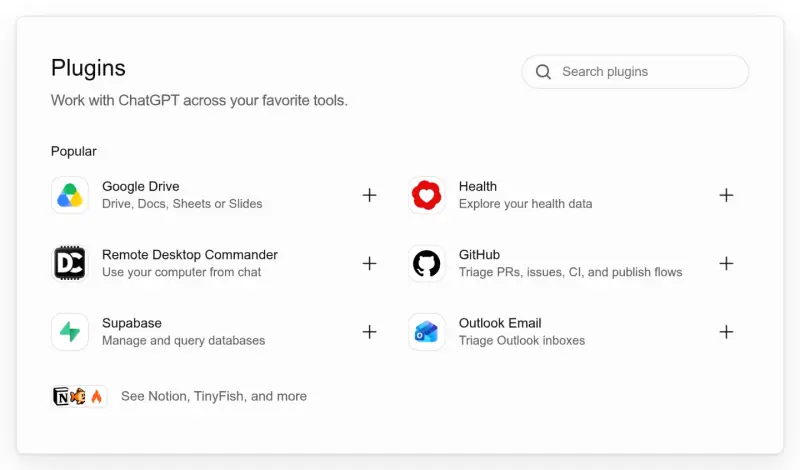
- Open the Plugin Directory and select a tool.
- Review its connected apps and setup requirements.
- Select Install plugin.
- If prompted, select Connect and sign in to the service.
After installation, ChatGPT can select a plugin when a request matches its function. To choose one directly, type @ and the plugin’s name, select the plus menu and enter the name, or choose Plugins in the composer. Plugins have also been available in Voice conversations since September 2026.
For most teaching and training teams, the most useful setup is a small set of tools that follows the work: research evidence, prepare the source material, create slides or translations, then produce a learner-facing lesson. Start with the step that consumes the most staff time, and choose the plugin whose output fits the way learners will use the material.