Real Estate Agents Can Use Short Explainers to Guide First-Time Buyers
Short, reviewed explainers can clarify forms and timelines for first-time buyers while keeping personal financial details in a conversation with their lender.
First-time buyers are a smaller and older group than they were in the past, while the home purchase process still asks them to absorb unfamiliar forms, costs and deadlines. The National Association of REALTORS® (NAR) reported in its 2025 Profile of Home Buyers and Sellers that first-time buyers accounted for 21% of purchases, a record low, and had a median age of 40. The same survey found that 88% of buyers used an agent or broker. For agents, short explainers offer a repeatable way to clarify general concepts between conversations, while leaving each buyer’s figures and decisions to direct discussion with the relevant professionals.
A useful starting point is one video for one topic: escrow, closing costs, an inspection notice or a timeline. Scrimba Explain, also listed in ChatGPT as Explain Video Generator, turns a PDF into narrated slides and diagrams. It doesn’t require filming or put an avatar on screen. Scrimba makes the product, and its documentation lists commercial use under the Pro plan. That matters for agents who intend to send videos to clients.
Choose the format for the conversation
Explainers fit processes and forms. They can show the sequence of steps, point out where a figure appears on a blank document, or spell out a general distinction such as the one between an inspection and an appraisal. They aren’t a substitute for a lender explaining a buyer’s costs or for a broker or attorney reviewing contract language.
| Conversation | Starting material | Suitable format | Review before sharing |
|---|---|---|---|
| Escrow and why a payment can change | Your buyer guide or the Consumer Financial Protection Bureau’s escrow page | Narrated explainer with a diagram | Ask the lender to check how escrow works in the relevant loan context |
| Closing costs and the Closing Disclosure | The CFPB’s blank sample form | Explainer about the form, followed by a conversation about the buyer’s figures | Broker review; never upload a client’s completed form |
| A disclosure or written buyer agreement | The relevant blank form or guide | Separate English and Spanish explainers | Broker review, and attorney review where required in the state |
| Inspection and contingency deadlines | Your buyer guide and the state purchase contract | Flowchart of the steps | Check every date against the contract and ask the broker to review |
| Pricing and the listing process for sellers | Your seller guide | Process explainer | Broker review |
| Introducing yourself to buyers | A script | Your own phone video or an avatar tool such as HeyGen | Check the plan’s limits and terms |
| Listing tours and social clips | Your own footage | Canva’s video editor | Review as marketing material |
Tool choice should follow the job. HeyGen’s pricing page lists a free tier with three watermarked videos per month, each up to one minute, one custom video avatar and more than 500 ready-made presenters. Its Creator plan is listed at $29 a month and adds 1080p export plus a custom avatar using the creator’s voice and likeness. Canva describes its video editor as free for editing personal clips on a timeline without watermarks. Neither is the same as a document-led explainer.
Keep each explainer short and specific
A narrated sequence works best when it follows one process in order. Scrimba’s use-case gallery features “The New Home Build Process,” a real estate example under two minutes long. It begins with a five-stage flowchart, then walks through eight stages from breaking ground to handover. A later “Key Milestones” slide revisits four milestones, and the video finishes with a one-question knowledge check.
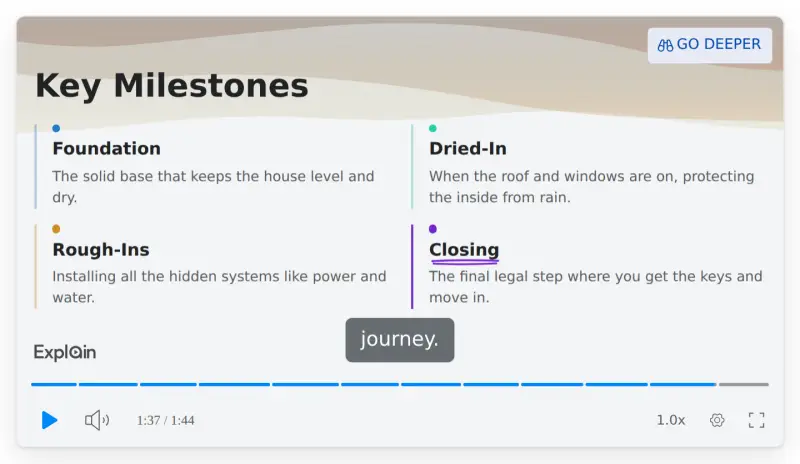
Scrimba’s quiz documentation describes these questions as private self-checks: only the viewer sees their result. The platform says a quiz is more likely to appear when requested, and that quizzes are available on explainers made on scrimba.com. Agents can also replace generated illustrations with their own pictures; Scrimba’s documentation says attached photos carry no tag.
The format is useful because it gives the agent control over what the video covers. A long guide can be divided into short explainers, each tied to one buyer question. That makes later corrections easier and helps a viewer return to the relevant topic without replaying a long presentation.
Build from a blank form, then verify every claim
HUD’s notice “For Your Protection: Get a Home Inspection” offers a clear example of a topic that benefits from careful explanation. It says a buyer must arrange a home inspection and that FHA does not perform one. It also explains that requesting an inspection early may allow the buyer to make the purchase contract contingent on the results. An appraisal, which estimates value for the lender, does not replace an inspection.
To make a video from this kind of document, start with the notice itself or a single section of your buyer guide. In Explain, set the visibility to Unlisted before creating or sharing the explainer. Scrimba says new explainers begin as Public when a user is signed in, and public explainers appear in the community. Unlisted videos are accessible to anyone with the link, so this setting reduces public listing but doesn’t make the link private to a specific client.
Attach a PDF or image; convert a Word guide to PDF first. Use a blank public form or your own guide, and keep clients’ completed contracts and financial documents out of the tool. Then ask for a plain-language explanation, specify the audience and identify the diagram or sequence that would help. For example, an instruction could ask for the difference between an inspection and an appraisal, when an inspection contingency may be relevant, and a flowchart from accepted offer to closing.
For clients watching on phones, Explain has a “Make for mobile” setting that creates a portrait format. Its composer starts in course mode, so turn off the playlist option when the goal is one standalone explainer. Scrimba’s documentation also shows that the narration appears as a transcript beneath the player. The company cautions that its AI can make mistakes, so compare each claim with the attached form and reliable guidance.
Broker review should come before client distribution, especially for videos about contracts, disclosures and deadlines. NAR’s consumer guide to written buyer agreements says practices may vary by state and local law. The guide concerns an agreement required for many agents since August 17, 2024. Where state requirements call for attorney involvement, the explainer needs that review as well. If the broker requests a change, Explain allows edits through a text box below the player; the documentation says slides not mentioned in an edit remain untouched. Free accounts get three edits per explainer.
Separate general explanations from personal figures
Escrow and closing costs are good topics for general education, but the video should not imply that one buyer’s numbers apply to another. The CFPB defines an escrow account as an account the mortgage lender sets up to pay certain property-related expenses from part of the monthly payment. Property taxes and insurance can change, which can change the escrow amount and the buyer’s total monthly payment. That relationship is worth making explicit in a simple slide.
The CFPB describes the Closing Disclosure as a five-page form that the lender must provide at least three business days before closing. Buyers can compare it with the Loan Estimate, and the CFPB’s guidance says this is the time to resolve problems. An explainer can walk viewers through a blank sample: where cash to close appears, what estimated escrow means and which figures to compare with the Loan Estimate. The buyer’s own completed form belongs in a direct conversation with the buyer and lender. Scrimba recommends splitting longer PDFs into a short series rather than forcing them into one video.
Make a separate version for Spanish-speaking buyers
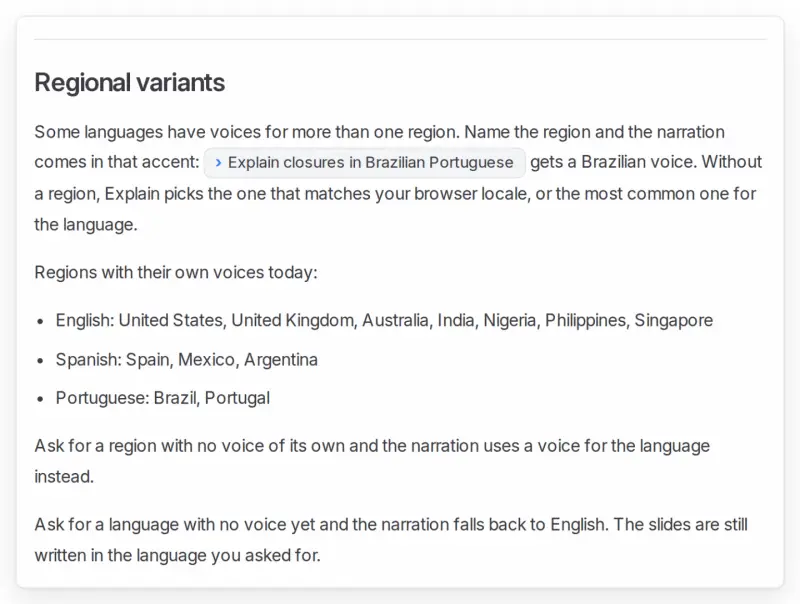
Explain supports narration in 33 languages, with Spanish voices for three regions. Scrimba’s language documentation says users can name the region to set the accent, such as Mexican Spanish. Create a second explainer from the same PDF rather than translating the English version in place. Scrimba’s editing documentation says rewriting narration in another language moves the explainer into that language, and its export documentation says editing retires saved video files. Each language version also counts separately toward the plan.
A fluent Spanish speaker should review the Spanish narration just as carefully as the broker checks the English version. That review can catch wording that is technically accurate but unclear or unnatural to the intended audience.
Share the explainer in a format buyers can use
Scrimba’s documentation lists commercial use under Pro, along with 100 explainers per month, unlimited edits, video downloads and the option to remove the Explain logo from slides. Without an account, a user can keep one explainer. A free account can keep five explainers for life, with three edits each and the logo visible. Those free limits can support a trial, while client use calls for the plan Scrimba lists for commercial use.
Agents can send an Unlisted link by text or email. The player also offers a fullscreen link that opens the lesson without the surrounding page. Alternatively, an Unlisted explainer can be embedded on a website that accepts HTML; Scrimba says site visitors don’t need an account to watch an embedded video. The embed doesn’t show the AI warning, so the agent should add a clear note beneath it, such as: “Reviewed by our broker. General information, not legal advice.” Pro users can export an MP4 at 1080p by default; portrait videos export at 1080 by 1920 pixels.
Explain counts views and likes, but doesn’t identify which buyer watched. Agents who need to confirm that a client has reviewed material should follow up directly.
When another format is a better fit
For an introduction where buyers need to see and hear the agent, a phone video may feel more personal. HeyGen’s free plan includes one custom avatar; Synthesia’s pricing page lists downloads from $19 per month on its Starter plan, with stock avatars. For listing tours and social clips, the job is marketing, and Canva’s editor or HeyGen’s real estate tools may fit better. Pictory is another option for videos built from a script or URL; its pricing page lists a free trial of three video projects.
For one buyer’s numbers, questions about a particular loan, or a legal issue, use a direct conversation with the lender, broker or attorney. The explainer’s role is to make the shared background easier to understand so that conversation can focus on what applies to that buyer.
Practical checks before sending
- Make one video per topic, using your own guide or a blank form; never upload a client’s completed documents.
- Use diagrams and narration to explain concepts and sequences, then verify the transcript against the source material.
- Check every deadline against the relevant purchase contract and have the broker review disclosures and contract explanations.
- Create a separate Spanish version, specify the audience’s regional variety and have a fluent speaker review it.
- Keep personal costs and loan figures in a conversation with the buyer and lender.
- Use a plan whose terms cover client use, and tell viewers when the explainer is general information.
Short videos can help agents answer recurring questions consistently, but their value depends on accuracy and scope. A reviewed explainer can orient buyers before a meeting; the buyer’s own documents and decisions still need a tailored conversation.